
I wanted the freedom to decide what happens before and after someone takes a photo. Laqtah began with that fairly simple expectation.
Why I started Laqtah
The photo-booth software I had explored did not give me the workflow flexibility I wanted. Its AI choices also felt restrictive. I wanted room to explore different models and providers, and some of the results I had seen changed a person's appearance too much. Those were my own experiences with the tools I tried, and they shaped the product I wanted to build.
I wanted to shape the sequence around the experience: an introduction, a language choice, consent, a countdown, a review decision. I also wanted guided configuration, so preparing those choices would not require rebuilding the application each time. AI was part of the original ambition, alongside a practical question: how would someone actually prepare and operate this?
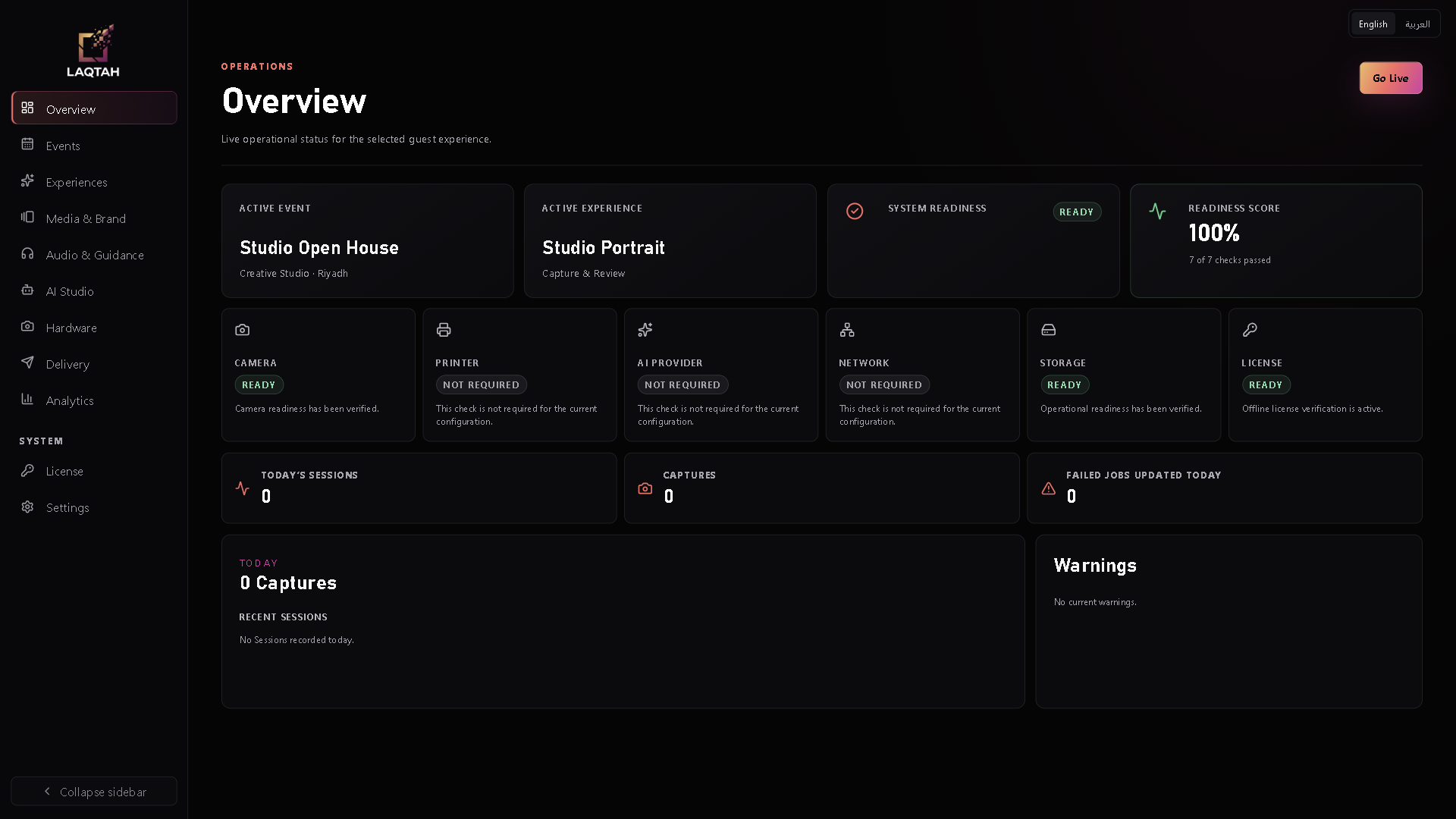
Laqtah now has a Windows-first desktop foundation: an operator workspace, a guest kiosk, saved experience configurations, editable workflows, bilingual interfaces and local webcam capture. Generative AI remains under development. The configuration system exists, but no approved generative image provider is connected in the current build.
Giving each decision a place
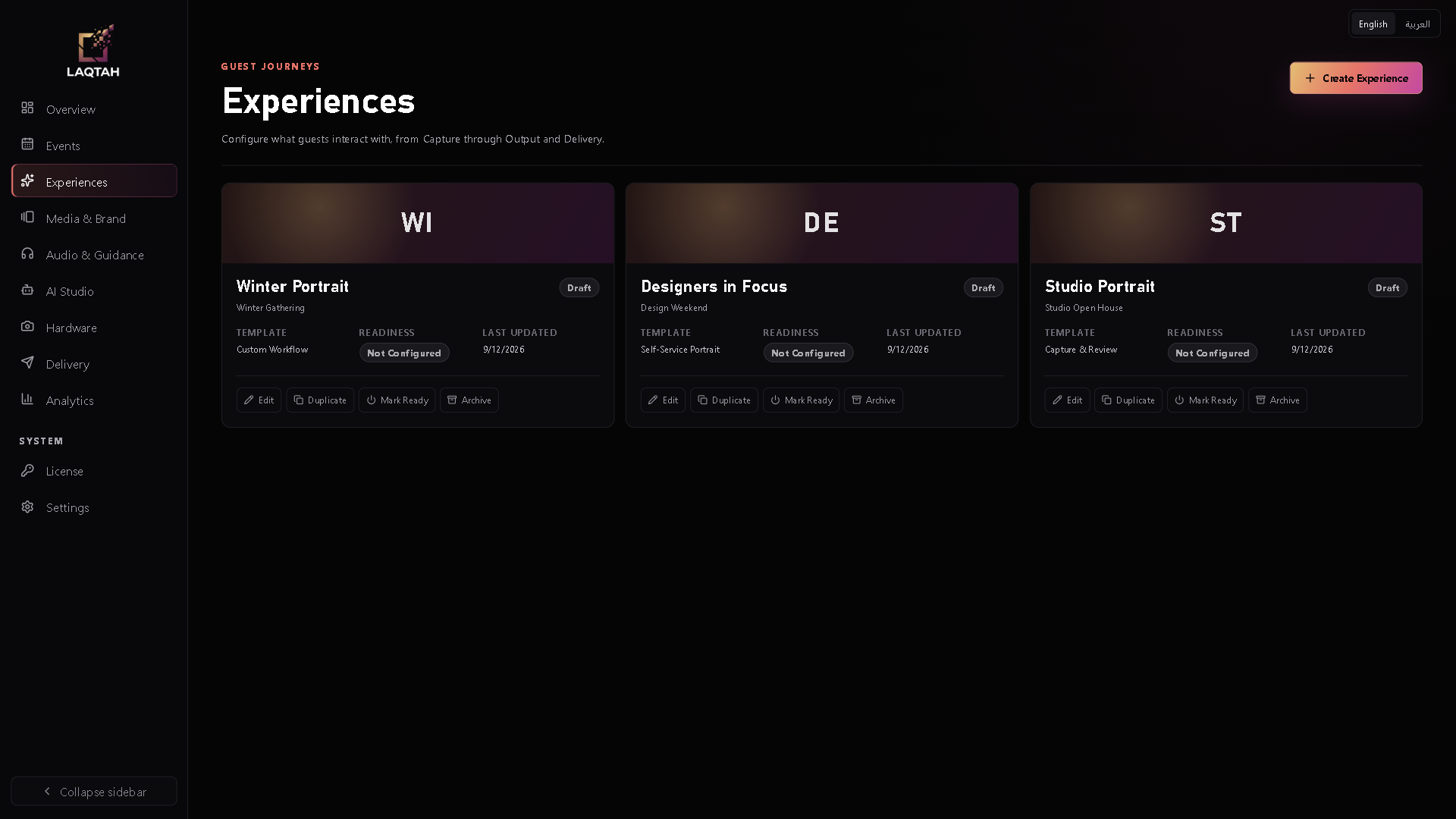
I separated the product into Events, Experiences and Workflows, with a Guest Session recording each person's progress. An event holds the wider context; an experience describes a particular journey within it. This lets me change a sequence without losing its event context, or prepare another experience without treating it as an entirely separate product.
- Event
The occasion, venue and organizing context.
- Experience
A guest journey prepared for that event.
- Workflow
The ordered steps and their configuration.
- Guest Session
One participant's progress and outcome.
Events and Experiences have their own screens. Templates provide a starting structure, while each experience keeps its own configuration and readiness state. The examples shown here use fictional events, venues and schedules; they illustrate the product's organization.
Making flexibility manageable
Guided Setup begins with the actions I want a guest to take. It turns those choices into a starting workflow, which I can refine in Advanced Mode. A simple Capture & Review journey gives the operator a useful local starting point. AI and printing choices also appear in the builder, but their presence does not make those integrations operational.
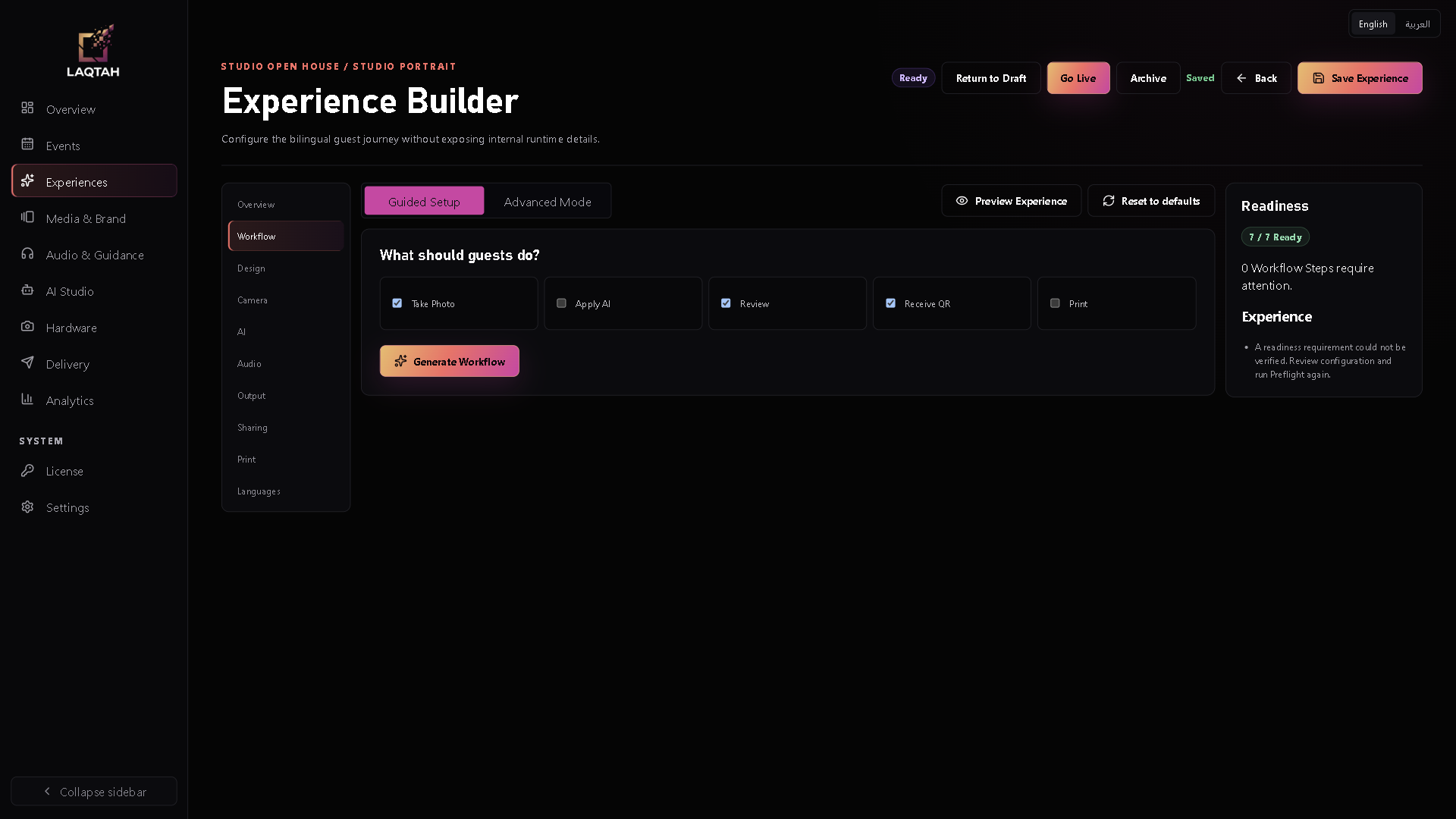
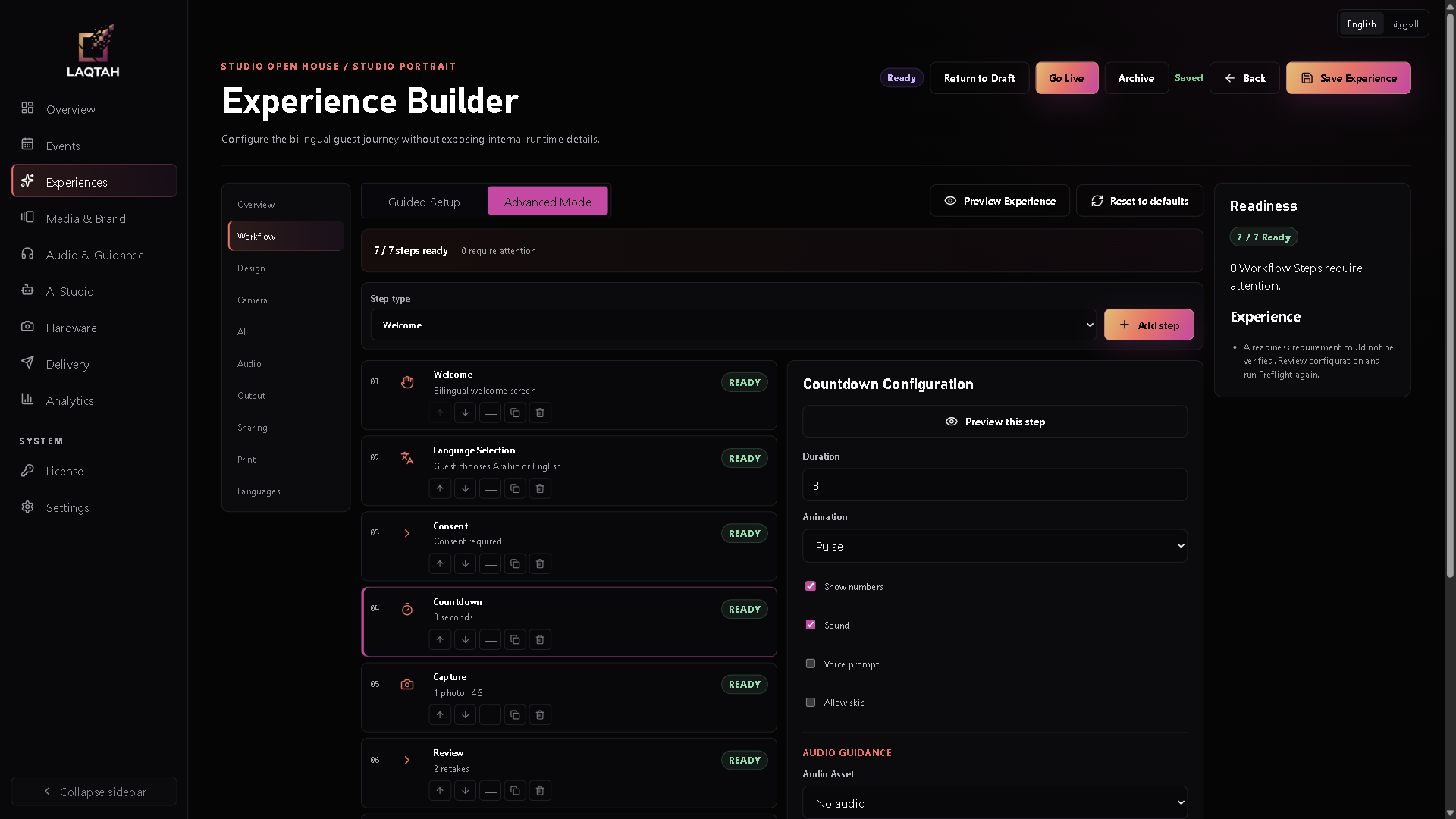
Advanced Mode exposes step order, enablement and configuration. A countdown can have its own timing; a capture or review step has different requirements. Moving or disabling a step can affect what follows it, so validation has to understand prerequisites as well as individual settings. I wanted flexibility to come with feedback the operator could act on.
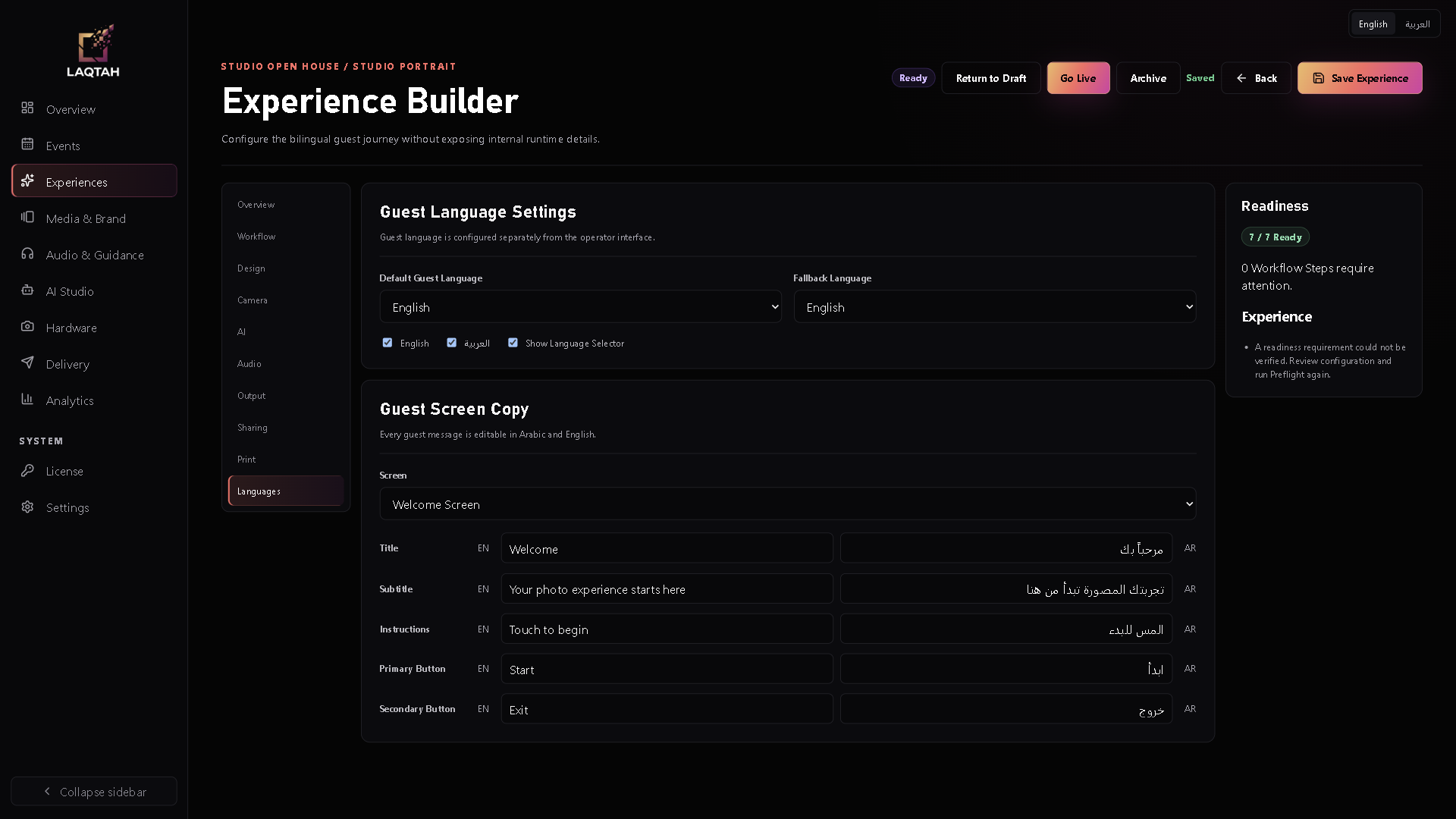
The builder's “7 / 7 Ready” means seven workflow steps are valid. Overall runtime readiness is a separate check. A generic camera-readiness warning remains visible in these builder screens, even though fresh preflight can pass for the synthetic-camera demonstration. That distinction matters: a well-formed sequence still needs its resources to be available when it runs.
Preparing the operator to go live
The operator journey I am building is straightforward: prepare an event, choose a starting experience, adjust its workflow, configure the resources it needs, review readiness and launch. Workflow, Design, Camera, AI, Audio, Output, Sharing, Print and Languages sit together in the Experience Builder so the preparation stays attached to the journey.
Go Live requires operator access and a PIN, and checks readiness again. Preview serves an earlier purpose: reviewing step order, guest copy and readiness information. It does not execute capture, generation, audio playback, sharing or printing, and it does not reproduce every design choice.
Design presets and media assignments are saved, but applying them throughout the live kiosk is still unfinished. The current guest screens use fixed branding. Keeping that boundary clear helps me prioritize the connection between saved choices and the actual guest experience.
From a configured workflow to a guest session
Once the operator launches, the guest sees the current step. The demonstrated journey begins with a welcome, offers Arabic or English, asks for consent, counts down, captures an image, offers review and reaches completion. This is where the builder's sequence becomes a set of decisions someone can follow.
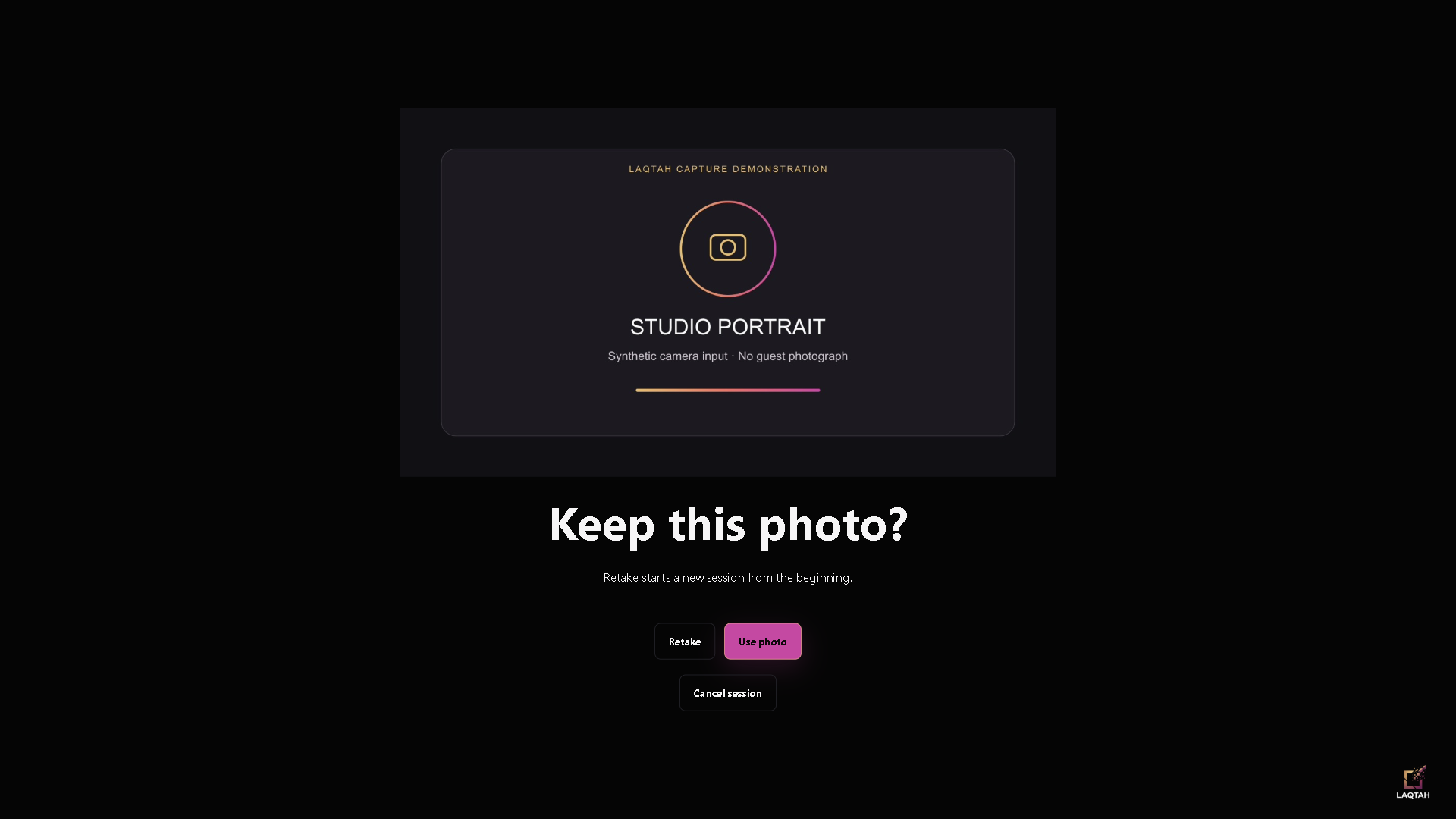
The local capture path requests the exact configured webcam and currently supports one photo per capture step. At review, accepting continues the journey; retaking starts a new session from the beginning. The image below is a clearly labeled synthetic camera card. It passed through the application's real capture, local storage and review flow before the demonstration reached completion.
Arabic and English belong in the product
I wanted bilingual operation to be part of how Laqtah is prepared and used. Guest messages are editable in Arabic and English, with default and fallback language settings. Guest language is configured separately from the operator interface, so the person preparing the event and the person taking part do not have to use the same language.
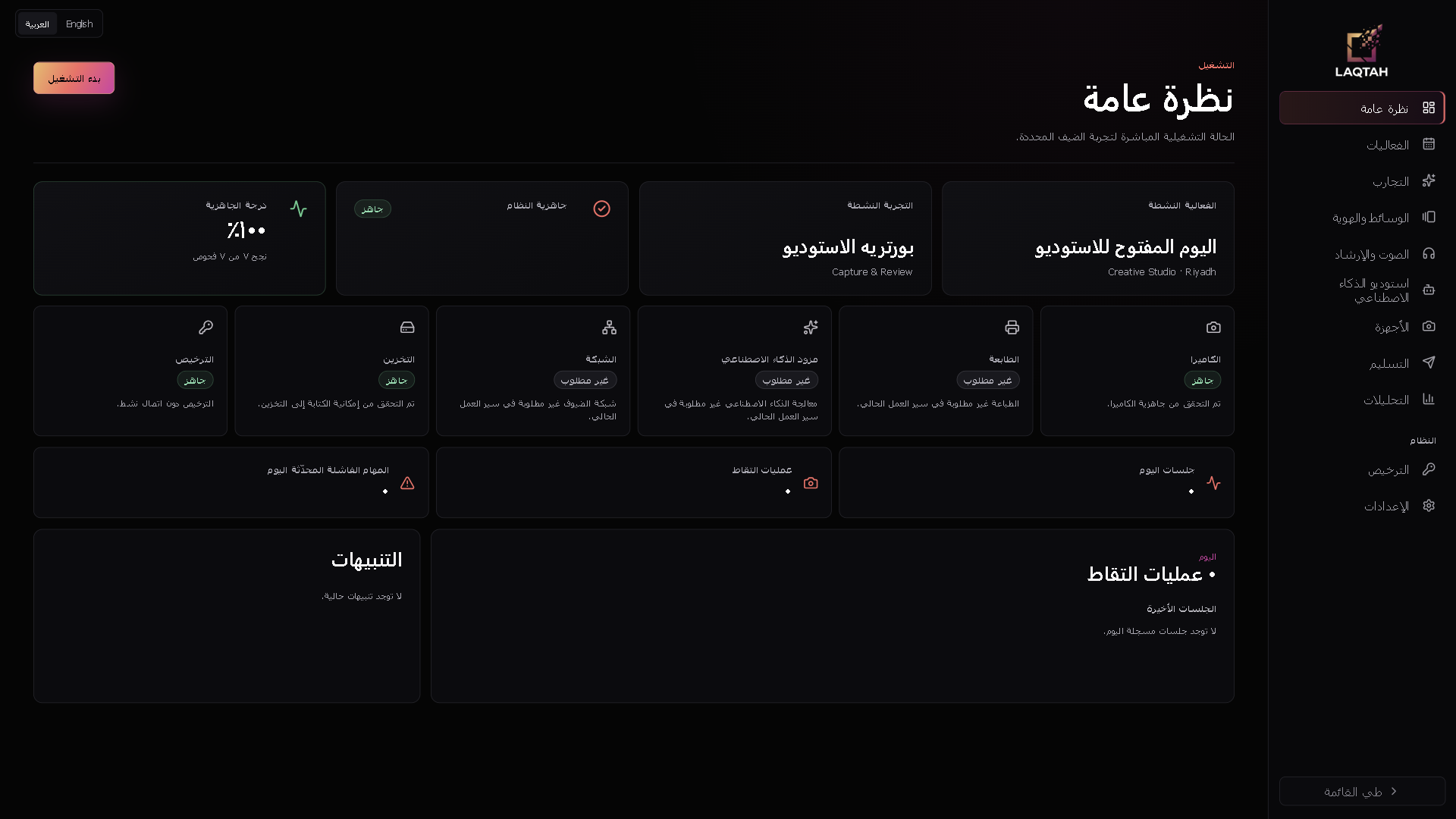
Language switching also changes reading direction. The operator workspace and guest interface handle RTL and LTR layouts. For me, this is an interaction decision: navigation, instructions and choices need to make sense in the language the person is using. The Arabic Overview shows that decision in the running interface.
The AI direction I am building toward
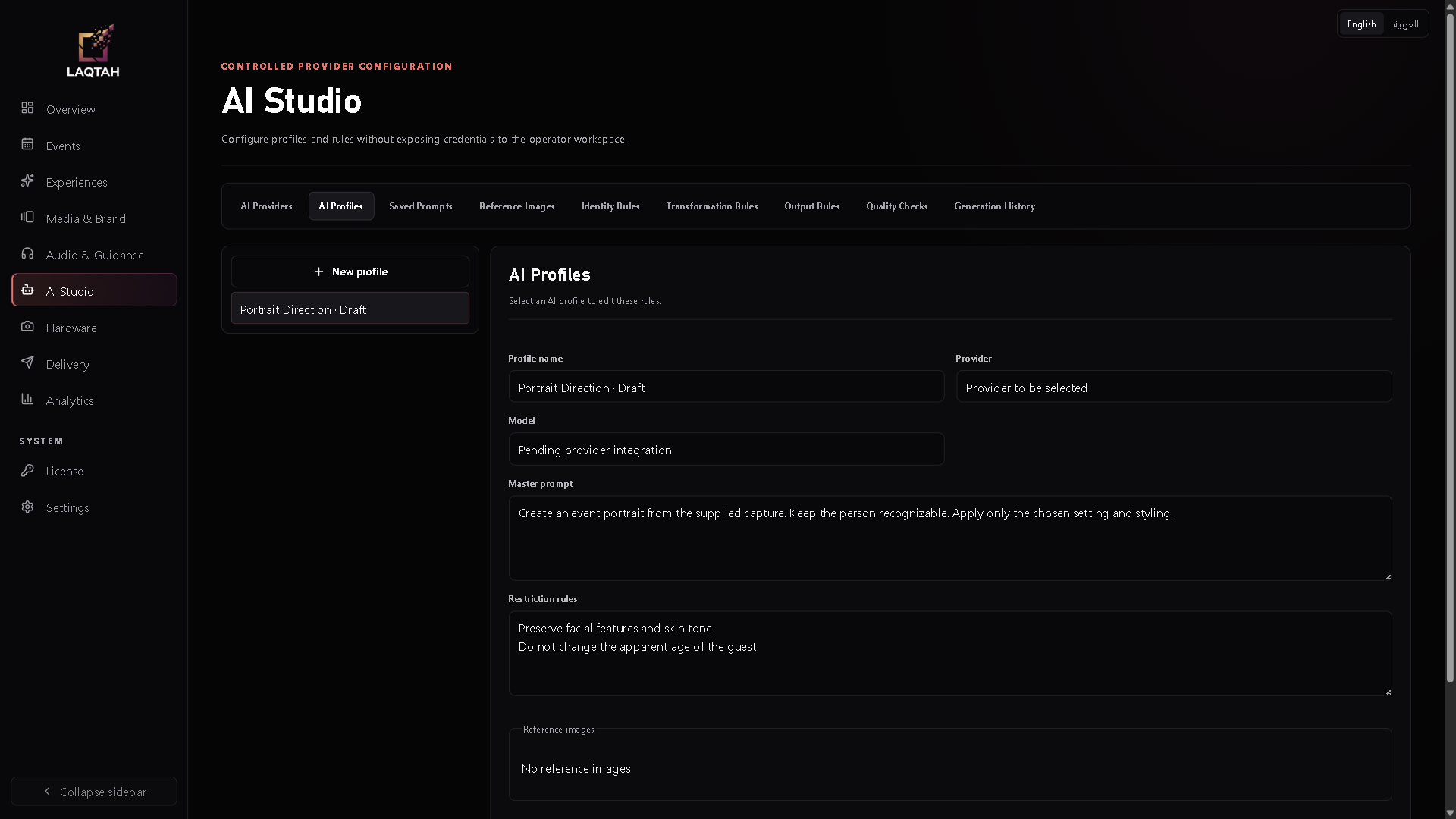
I want control over the transformation, its position in the workflow and the model behind it. Exploring image models from providers such as Google and OpenAI is part of that direction. Today, AI Studio stores profiles, provider and model choices, prompts, references, and transformation, identity and output settings. These are preparation tools for future integration.
The current application reports that no approved AI provider adapter is configured. There is no completed Laqtah generative portrait flow to demonstrate yet. A local Sharp provider supports basic enhancement through orientation handling, normalization and JPEG output. That limited operation does not generate portraits, and ordinary capture does not automatically imply that processing ran.
The person should still recognize themselves
My concern about altered appearance became a product requirement. Laqtah has identity configuration modes called preserve, guided and transform, alongside reference and quality settings. They give me a way to express the intended treatment of identity. Their names do not establish that a model will follow those instructions.
Reliable identity preservation will need a connected provider and evaluation of real outputs: which changes are acceptable, how an unsuitable result is recognized, and what happens next. There is also local segmentation groundwork using bundled MediaPipe assets, but the live guest renderer does not call the segmentation hook yet. Live background segmentation remains unfinished.
Building the system underneath
I chose Electron, React and TypeScript for a desktop application centered on local operation. React presents the operator and guest views. A narrow preload interface passes validated requests to Electron's main process, which owns persistence, privileged actions and provider execution. The renderer runs in a sandbox without Node.js access. The interface asks for specific actions rather than general access to the computer.
A capture must belong to the correct guest session and workflow step. The main process issues the identifiers that bind that submission, and checks them before accepting the image. Workflow progress is persisted, so recovery can return to the saved step even if the operator later edits the experience. That relationship between configuration and execution became one of the central engineering challenges.
Local persistence uses SQL.js, transactional changes and atomic database-file replacement. Migration handling includes integrity checks and backups before changing a legacy file. Durable cleanup records distinguish interrupted capture work from committed media. These safeguards support recovery, while proving backup restoration on a target machine remains a separate operational task.
What building it has taught me
I started by wanting more creative control. Building the product has made me spend just as much attention on the operator's next decision, the guest's current state and the meaning of a saved image. A configurable system needs clear limits and understandable feedback. Otherwise, every new choice becomes another thing someone has to diagnose on their own.
I want the flexibility in the builder to remain understandable when someone is standing in front of the camera.
I have also learned to separate a configuration surface from a working integration. Camera, processing, printing and sharing interfaces give future implementations a defined place. Physical devices, venue networks and AI outputs still need their own qualification. Keeping those responsibilities visible is part of moving from a demonstration toward a product people can operate.
What I want to connect next
My next priorities are generative provider integration, identity evaluation and clearer guided configuration as more choices become operational. Real camera qualification and printer integration also remain ahead: the current application has no selected production DSLR driver, and its printer adapter is explicitly unavailable. A completed physical capture-to-print experience is still future work.
Local-network sharing already has a service with expiring links and QR output, but guest-phone handoff still needs validation across the venue network and firewall. Cloud, email, SMS and WhatsApp delivery are future integrations. Signed release and clean-machine qualification also remain ahead of customer release.
For me, Laqtah is part of taking Pixel Pro Lab further into product development: an event model, a builder, a guest journey and local state that the application can account for. I want to connect the creative capabilities with the same care. The person setting up the booth should be able to shape the experience, and the person in front of the camera should feel that the result is still theirs.
أردت أن أتحكم فيما يحدث قبل التقاط الصورة وبعدها. من هذا التوقع البسيط بدأت فكرة Laqtah.
لماذا بدأت Laqtah
لم تمنحني برامج أكشاك التصوير التي جربتها المرونة التي أردتها في سير العمل، وشعرت أيضاً بأن خيارات الذكاء الاصطناعي محدودة. كنت أريد مساحة لتجربة نماذج ومزوّدين مختلفين، ووجدت أن بعض النتائج التي شاهدتها تغيّر مظهر الشخص أكثر مما أراه مناسباً. هذه ملاحظاتي الشخصية على الأدوات التي جربتها، ومنها تشكّلت فكرة المنتج الذي أردت بناءه.
أردت تشكيل تسلسل الخطوات بحسب التجربة: مقدمة، واختيار اللغة، والموافقة، والعد التنازلي، ثم مراجعة الصورة. وأردت إعداداً موجّهاً يتيح ترتيب هذه الخيارات دون إعادة بناء التطبيق في كل مرة. كان الذكاء الاصطناعي جزءاً من الطموح منذ البداية، ومعه سؤال عملي: كيف سيجهّز المشغّل هذه التجربة ويديرها فعلياً؟
أصبح لدى Laqtah اليوم أساس كتطبيق مكتبي موجّه إلى Windows: مساحة عمل للمشغّل، وواجهة للضيف، وإعدادات تجارب محفوظة، ومسارات عمل قابلة للتعديل، وواجهات بالعربية والإنجليزية، والتقاط محلي عبر كاميرا الويب. أما توليد الصور بالذكاء الاصطناعي فما زال قيد التطوير؛ بنية الإعدادات موجودة، لكن النسخة الحالية غير متصلة بأي مزوّد معتمد لتوليد الصور.
مساحة واضحة لكل قرار
قسّمت المنتج إلى فعاليات وتجارب ومسارات عمل، مع جلسة ضيف تسجّل تقدّم كل مشارك. تحتفظ الفعالية بالسياق العام، وتحدّد التجربة رحلة بعينها داخل هذا السياق. بهذا أستطيع تعديل تسلسل الخطوات مع الحفاظ على ارتباطه بالفعالية، أو إعداد تجربة أخرى دون التعامل معها كمنتج مستقل بالكامل.
- الفعالية
المناسبة والموقع والسياق التنظيمي.
- التجربة
رحلة ضيف تُجهّز ضمن الفعالية.
- سير العمل
الخطوات المرتّبة وإعدادات كل خطوة.
- جلسة الضيف
تقدّم مشارك واحد ونتيجة جلسته.
خصّصت شاشات مستقلة للفعاليات والتجارب. توفّر القوالب نقطة بداية، وتحتفظ كل تجربة بإعداداتها وحالة جاهزيتها. وتستخدم الأمثلة المعروضة فعاليات ومواقع ومواعيد افتراضية لتوضيح طريقة تنظيم المنتج.
جعل المرونة قابلة للإدارة
يبدأ الإعداد الموجّه بالأفعال التي أريد من الضيف تنفيذها، ثم يحوّل هذه الخيارات إلى مسار أولي أستطيع تحسينه في الوضع المتقدّم. وتوفّر تجربة «التقاط ومراجعة» نقطة بداية محلية مفيدة للمشغّل. تظهر أيضاً خيارات الذكاء الاصطناعي والطباعة في أداة البناء، لكن وجودها لا يعني أن تكاملاتها تعمل فعلياً.
يعرض الوضع المتقدّم ترتيب الخطوات وتفعيلها وإعداداتها. للعد التنازلي توقيته، وللالتقاط أو المراجعة متطلبات مختلفة. وقد يؤثّر نقل خطوة أو تعطيلها فيما يليها، لذلك يجب أن يفهم التحقق المتطلبات السابقة إلى جانب إعدادات كل خطوة. أردت أن ترافق المرونة ملاحظات واضحة يستطيع المشغّل التعامل معها.
تعني عبارة «7 / 7 Ready» في أداة البناء أن خطوات سير العمل السبع صالحة من حيث الإعداد. أما جاهزية التشغيل الكاملة فتُفحص بصورة مستقلة. يظل تنبيه عام مرتبط بجاهزية الكاميرا ظاهراً في هذه الشاشات، حتى مع نجاح فحص ما قبل التشغيل للتجربة التي تستخدم مصدراً اصطناعياً للكاميرا. وهذا فرق أساسي: صحة التسلسل لا تكفي ما لم تتوافر موارده عند تشغيله.
تجهيز المشغّل لبدء التجربة
رحلة المشغّل التي أبنيها واضحة: إعداد فعالية، واختيار تجربة أولية، وضبط سير عملها، وتهيئة الموارد التي تحتاجها، ثم مراجعة الجاهزية وبدء التشغيل. تجمع أداة بناء التجربة سير العمل والتصميم والكاميرا والذكاء الاصطناعي والصوت والمخرجات والمشاركة والطباعة واللغات، لتظل خطوات الإعداد مرتبطة بالتجربة نفسها.
يتطلب بدء التشغيل صلاحية المشغّل ورمز PIN، ويعيد فحص الجاهزية. أما المعاينة فتخدم مرحلة أسبق: مراجعة ترتيب الخطوات ونصوص الضيف ومعلومات الجاهزية. وهي لا تنفّذ الالتقاط أو التوليد أو تشغيل الصوت أو المشاركة أو الطباعة، ولا تعرض جميع خيارات التصميم بصورة مطابقة للتشغيل الفعلي.
تُحفَظ قوالب التصميم وتعيينات الوسائط، لكن تطبيقها على جميع شاشات الضيف أثناء التشغيل لم يكتمل بعد. تستخدم الواجهة الحالية هوية ثابتة. ويساعدني وضوح هذا الحد على إعطاء الأولوية لربط الخيارات المحفوظة بما يراه الضيف فعلياً.
من سير عمل مُعدّ إلى جلسة ضيف
بعد بدء التشغيل، يرى الضيف الخطوة الحالية. تبدأ الرحلة المعروضة بالترحيب، ثم تتيح العربية أو الإنجليزية، وتطلب الموافقة، وتبدأ العد التنازلي، وتلتقط الصورة، وتعرضها للمراجعة، ثم تصل إلى الإكمال. هنا يتحوّل التسلسل الذي أعدّه المشغّل إلى قرارات واضحة يستطيع الضيف متابعتها.
يطلب مسار الالتقاط المحلي كاميرا الويب المحدّدة في الإعدادات، ويدعم حالياً صورة واحدة لكل خطوة التقاط. في المراجعة، يؤدي اعتماد الصورة إلى متابعة الرحلة، بينما تبدأ إعادة التصوير جلسة جديدة من البداية. الصورة أدناه بطاقة اصطناعية موضّحة بعبارة صريحة؛ وقد مرّت عبر مسار الالتقاط والتخزين المحلي والمراجعة الفعلي في التطبيق، ثم وصلت التجربة إلى الإكمال.
العربية والإنجليزية جزء من المنتج
أردت أن يكون التشغيل بالعربية والإنجليزية جزءاً من طريقة إعداد Laqtah واستخدامه. يمكن تحرير رسائل الضيف باللغتين، مع تحديد اللغة الافتراضية واللغة البديلة عند الحاجة. وتُضبط لغة الضيف بصورة مستقلة عن واجهة المشغّل، فلا يلزم أن يستخدم من يجهّز الفعالية ومن يشارك فيها اللغة نفسها.
يغيّر تبديل اللغة اتجاه القراءة أيضاً، إذ تدعم مساحة المشغّل وواجهة الضيف الاتجاهين من اليمين إلى اليسار ومن اليسار إلى اليمين. بالنسبة لي، هذا قرار يخص الاستخدام نفسه: يجب أن تكون عناصر التنقل والتعليمات والخيارات مفهومة في اللغة التي يستخدمها الشخص. وتُظهر شاشة النظرة العامة بالعربية هذا القرار داخل الواجهة أثناء التشغيل.
الاتجاه الذي أبنيه للذكاء الاصطناعي
أريد التحكم في التحويل البصري، وموضعه ضمن سير العمل، والنموذج الذي ينفّذه. ومن هذا التوجّه رغبتي في استكشاف نماذج الصور لدى مزوّدين مثل Google وOpenAI. يحفظ استوديو الذكاء الاصطناعي اليوم الملفات التعريفية وخيارات المزوّد والنموذج والتعليمات والمراجع وإعدادات التحويل والهوية والمخرجات. وهي أدوات إعداد لتكامل مستقبلي.
يوضّح التطبيق الحالي أنه لم يُضبط أي محوّل معتمد لمزوّد ذكاء اصطناعي. لذلك لا توجد حتى الآن رحلة مكتملة لتوليد الصور الشخصية في Laqtah يمكن عرضها. توجد معالجة محلية عبر Sharp تدعم تحسيناً أساسياً يشمل تصحيح الاتجاه وضبط الصورة وإخراج JPEG. هذه العملية المحدودة لا تولّد صوراً شخصية، كما أن التقاط صورة عادية لا يعني تلقائياً أنها مرّت بهذه المعالجة.
أن يبقى الشخص قادراً على التعرّف على نفسه
تحوّل قلقي من تغيّر مظهر الشخص إلى متطلب في المنتج. تتضمن إعدادات الهوية في Laqtah أوضاع preserve وguided وtransform، إلى جانب إعدادات المراجع والجودة. تمنحني هذه الخيارات طريقة لتحديد المعالجة المقصودة لهوية الشخص، لكن أسماءها وحدها لا تثبت أن النموذج سيلتزم بالتعليمات.
يتطلب الحفاظ الموثوق على الهوية مزوّداً متصلاً وتقييماً للنتائج الفعلية: ما التغييرات المقبولة، وكيف نكتشف نتيجة غير مناسبة، وما الخطوة التالية عند حدوث ذلك. وتوجد أيضاً أعمال تأسيسية محلية لفصل العنصر عن الخلفية باستخدام ملفات MediaPipe المضمّنة، لكن واجهة الضيف الحالية لا تستدعي آلية الفصل بعد. لذلك يظل فصل الخلفية أثناء التشغيل عملاً غير مكتمل.
بناء النظام الذي يدير التجربة
اخترت Electron وReact وTypeScript لبناء تطبيق مكتبي يضع التشغيل المحلي في أساسه. يعرض React واجهتي المشغّل والضيف، وتنقل واجهة preload محدودة طلبات متحقّقاً منها إلى العملية الرئيسية في Electron، المسؤولة عن الحفظ والإجراءات ذات الصلاحيات وتشغيل المزوّدين. تعمل طبقة الواجهة في بيئة معزولة دون وصول إلى Node.js، وتطلب إجراءات محدّدة دون صلاحية عامة على الجهاز.
يجب أن ترتبط كل صورة بجلسة الضيف وخطوة سير العمل الصحيحتين. تُصدر العملية الرئيسية المعرّفات التي تربط عملية تسليم الصورة، وتتحقق منها قبل قبولها. كما يُحفَظ تقدّم سير العمل، ليتمكن الاسترجاع من العودة إلى الخطوة المحفوظة حتى لو عدّل المشغّل التجربة لاحقاً. أصبحت هذه العلاقة بين الإعداد والتنفيذ من التحديات الهندسية الأساسية في المشروع.
يعتمد الحفظ المحلي على SQL.js، وتغييرات ضمن معاملات، واستبدال ذرّي لملف قاعدة البيانات. وتتضمن ترقية البيانات فحوص سلامة ونسخاً احتياطية قبل تعديل ملف من إصدار سابق. وتساعد سجلات التنظيف المحفوظة على التمييز بين أعمال الالتقاط المنقطعة والوسائط التي اكتمل حفظها. تدعم هذه الإجراءات الاسترجاع، مع بقاء التحقق من استعادة النسخ الاحتياطية على الجهاز المستهدف مهمة تشغيلية مستقلة.
ما تعلّمته أثناء البناء
بدأت برغبة في مساحة أوسع للتحكم الإبداعي. ومع بناء المنتج، أصبحت أمنح القدر نفسه من الاهتمام لقرار المشغّل التالي، وحالة الضيف الحالية، ومعنى أن تكون الصورة قد حُفظت بالفعل. يحتاج النظام القابل للتهيئة إلى حدود واضحة وملاحظات مفهومة؛ وإلا تحوّل كل خيار جديد إلى أمر إضافي يضطر المستخدم إلى تشخيصه بنفسه.
أريد أن تظل المرونة التي أوفّرها في أداة البناء مفهومة عندما يقف شخص أمام الكاميرا.
تعلّمت أيضاً التمييز بين شاشة الإعدادات والتكامل الذي يعمل فعلياً. تمنح واجهات الكاميرا والمعالجة والطباعة والمشاركة مكاناً محدّداً للتنفيذ المستقبلي، لكن الأجهزة الفعلية وشبكات المواقع ونتائج الذكاء الاصطناعي تحتاج إلى تحقق مستقل. إبقاء هذه المسؤوليات واضحة جزء من الانتقال من عرض تجريبي إلى منتج يستطيع الناس تشغيله.
ما أريد استكماله بعد ذلك
أولوياتي التالية هي ربط مزوّد لتوليد الصور، وتقييم الحفاظ على الهوية، وتوضيح الإعداد الموجّه كلما أصبحت خيارات إضافية قابلة للتشغيل. وما زال التحقق من الكاميرات الفعلية وتكامل الطباعة أمامي: لا يتضمن التطبيق الحالي برنامج تشغيل إنتاجياً مختاراً لكاميرات DSLR، ومحوّل الطابعة يعلن صراحةً أنه غير متاح. لذلك تبقى تجربة فعلية مكتملة من الالتقاط إلى الطباعة عملاً مستقبلياً.
توجد خدمة للمشاركة عبر الشبكة المحلية بروابط محددة الصلاحية ومخرجات QR، لكن تسليم الصورة إلى هاتف الضيف ما زال يحتاج إلى تحقق عبر شبكة الموقع وجدار الحماية. أما التسليم السحابي والبريد الإلكتروني والرسائل النصية وWhatsApp فهي تكاملات مستقبلية. كذلك يبقى توقيع الإصدار والتحقق من تشغيله على جهاز نظيف من متطلبات الإصدار الموجّه للعملاء.
بالنسبة لي، يمثّل Laqtah خطوة في توسيع عمل Pixel Pro Lab في تطوير المنتجات: نموذج للفعاليات، وأداة بناء، ورحلة ضيف، وحالة محلية يستطيع التطبيق تتبّعها والتحقق منها. أريد أن أربط القدرات الإبداعية بالعناية نفسها. يجب أن يتمكن من يجهّز كشك التصوير من تشكيل التجربة، وأن يشعر من يقف أمام الكاميرا بأن النتيجة ما زالت تعبّر عنه.