
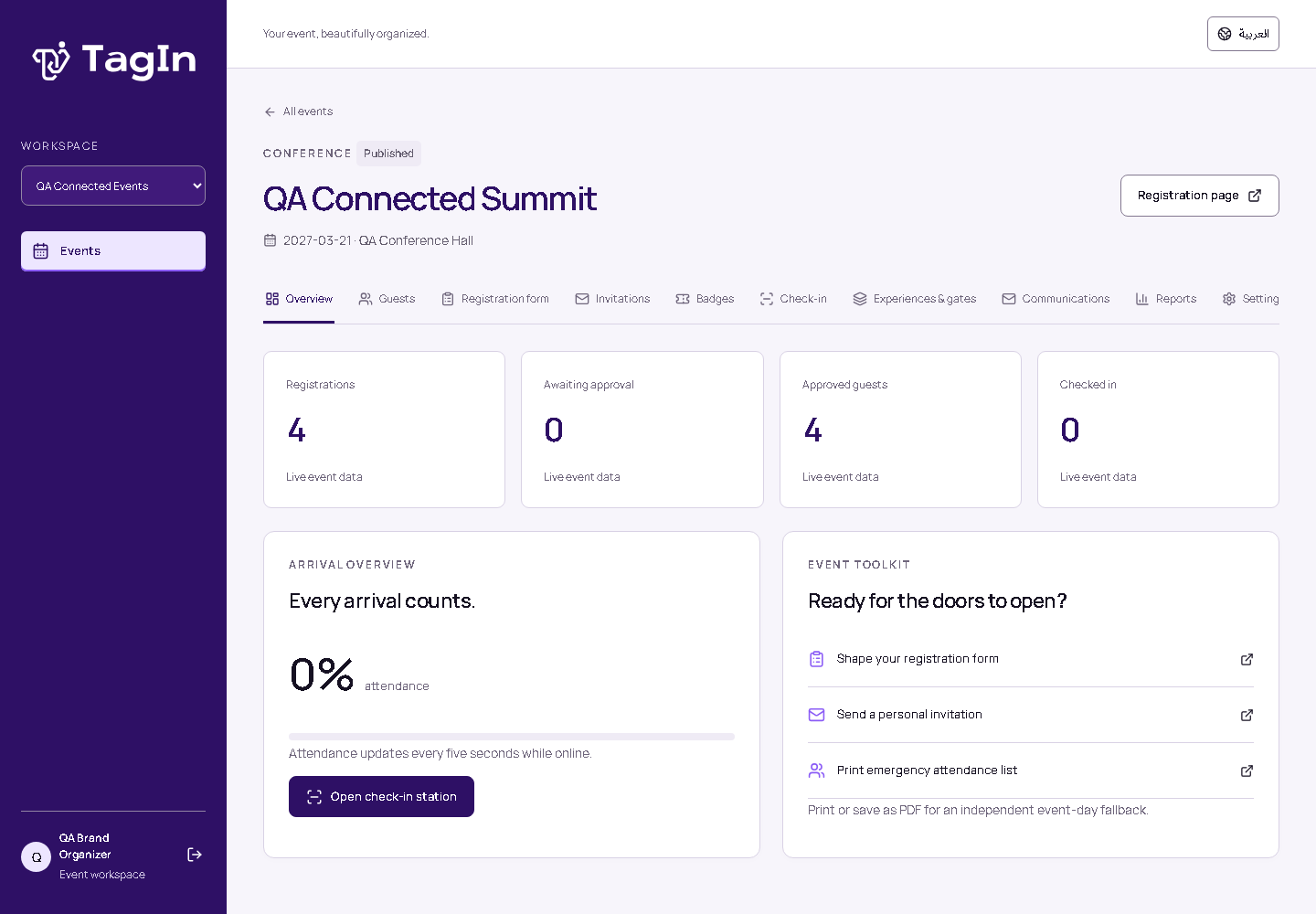
I built TagIn around a practical question: how do I keep the journey from registration to arrival connected, while giving the team on the ground a clear way to operate? A registration form is one part of that journey. Approval, credentials, badges, check-in and access to individual experiences all need to agree with it.
Why I started with the whole journey
My work sits between event technology and software development. When I design an event system, I think about both the person completing a form and the operator making a decision at the entrance. I wanted TagIn to give those two sides a shared foundation, with the organizing team able to configure the experience before the doors open.
That led me to a bilingual attendee operations platform: an organizer workspace, public registration journeys, QR credentials, badge preparation and check-in tools. I kept the scope focused on the work of an event rather than trying to turn the first version into every possible event-management service.
One person, an event, several experiences
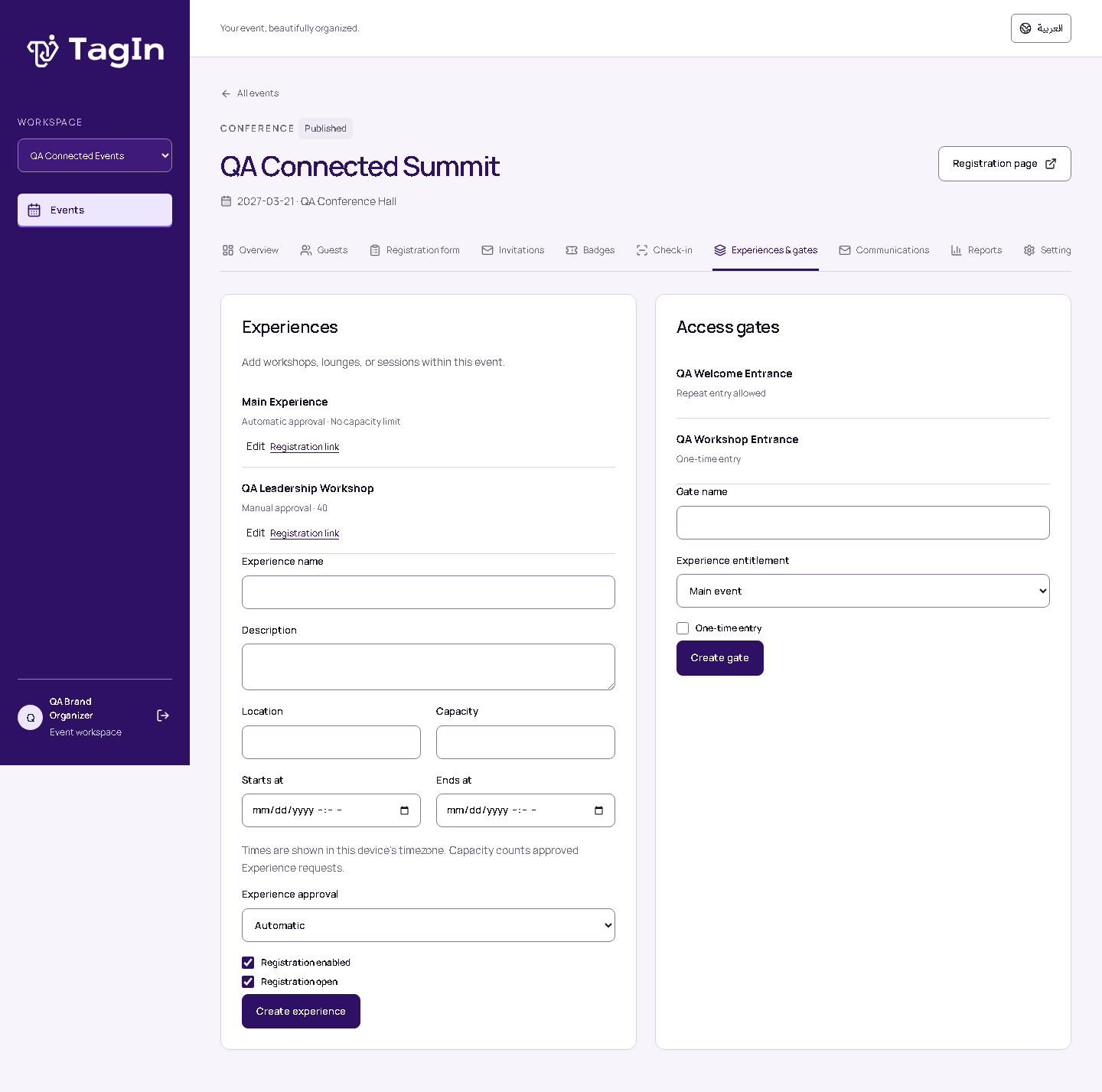
I organized the system around Organization, Event and Experience. A contact belongs to an organization; a registration connects that contact to an event. Workshops, lounges and sessions can then have their own participation rules without creating a disconnected attendee record for each activity.
- Organization
The team’s workspace, contacts, reusable templates and permissions.
- Event
The registration journey, invitations, credentials, badges and arrival record.
- Experience
A session or activity with its own schedule, approval, optional capacity and access rules.
An approved place in an experience and an approved event registration are different decisions. I kept that distinction explicit. A manual request can wait for review without consuming a capacity slot, while approved experience participation reserves one. Access still depends on the parent registration and the applicable gate rules.
Registration that belongs to the event
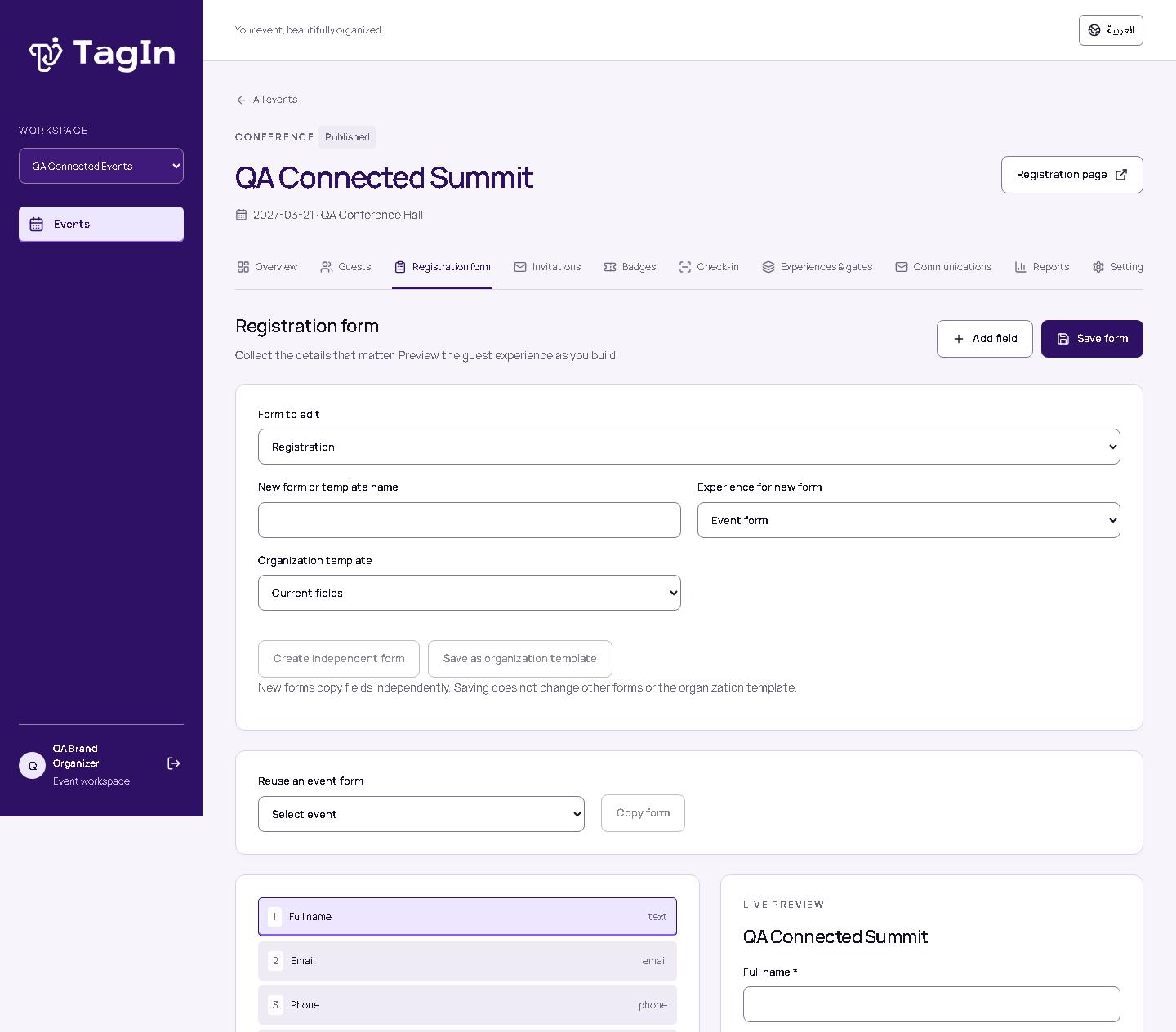
I wanted organizers to shape the information they collect instead of adapting every event to one fixed form. TagIn supports editable fields, conditional questions, translated labels, sections and form artwork. Organization templates can be reused, but each new event or experience receives an independent copy so a later template edit does not unexpectedly change an existing registration journey.
Branding follows the same principle. TagIn’s Connected Identity belongs to the organizer workspace. Public attendee pages use the event’s configured identity, with organization defaults where appropriate. The software supports the event rather than making every attendee journey look like the platform.
Keeping credentials, arrival and access separate
I did not want a single “checked in” flag to carry every operational decision. TagIn keeps registration approval, credential validity, event arrival, badge generation and experience access separate. A guest can have a valid event credential and still lack permission for a particular workshop; printing a badge should not silently record an arrival.
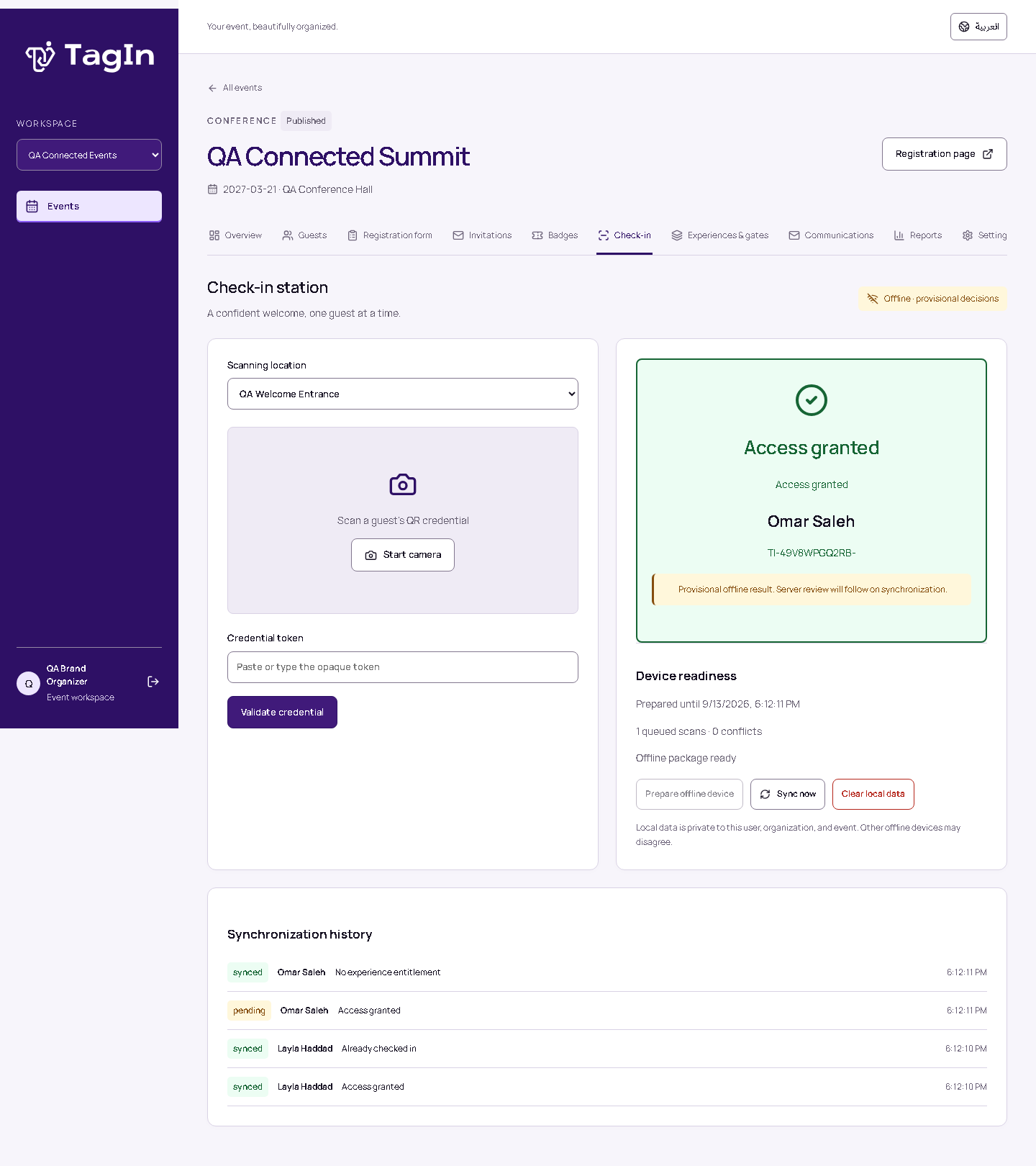
The QR credential uses an opaque, event-specific value rather than placing personal details inside the code. Operators can scan or enter it manually, and gates can allow repeat entry or one-time access. Printable badges and an emergency attendance list give the team another way to prepare, while the system retains a record of the decisions it makes.
Preparing for a connection that may disappear
I designed offline operation as a preparation step. While connected, an authorized operator prepares the device with the event data and selected operational assets it needs. IndexedDB stores that package and a durable action queue; the service worker keeps the application shell available. Private API responses and arbitrary uploads are not swept into a general browser cache.
Every queued action keeps its original identity, time and payload through a reload or retry. When the connection returns, the server checks current permissions and eligibility and reconciles the action. Repeating the same action returns its recorded result instead of creating a second arrival or registration.
I also made the limit visible: offline decisions are provisional. Another station may have recorded an arrival or revoked a credential since this device prepared its data. TagIn shows queued work and conflicts so an operator can see what still needs review. Separate disconnected devices do not share a live consensus.
Arabic and English are part of the workflow
I treated Arabic and English as part of the product structure. Operator screens, registration journeys, form labels, communication templates and badge typography support both languages. Arabic uses right-to-left layout, while identifiers and brand artwork remain readable in their own direction. A person can enter their name in one language; the workflow does not require duplicate Arabic and English identities.
The engineering behind the interface
I chose a React and TypeScript interface with a Django API and a relational data model. The API owns tenant permissions, registration rules, approval, capacity and replay decisions. The browser handles interaction and explicitly prepared offline work. SQLite supports local development; PostgreSQL is the hosted database target.
Keeping those responsibilities clear matters to me. Hiding a button is not authorization, and a prepared browser snapshot is not the final authority for access. Organization and event boundaries have to remain enforceable on the server, including when a device returns with work it completed while disconnected.
What I can show today
TagIn now has a working foundation covering registration, experiences, QR credentials, badges, check-in and prepared offline workflows. The project’s verification records include PostgreSQL concurrency checks, browser sessions with the network actually disabled, replay regressions and inspection of generated badge PDFs. Those records describe specific tested behavior, not a promise of unlimited capacity or zero downtime.
Hosted rollout remains a separate step: production infrastructure, email delivery, venue load, backups and physical camera or printer operation need their own validation. The screenshots here are actual software captures using synthetic events and attendees; they show the product without exposing operational guest data.
For me, TagIn is a way to bring system automation closer to on-ground execution. I want the team to know what has been approved, what has happened, what can happen next and what still needs a decision. That clarity is the product I am building through Pixel Pro Lab.
طوّرت TagIn انطلاقًا من سؤال عملي: كيف أربط رحلة الحضور من التسجيل حتى الوصول، وأمنح الفريق الميداني طريقة واضحة للتشغيل؟ نموذج التسجيل جزء من هذه الرحلة؛ فالموافقة، وبيانات الدخول، وبطاقات الحضور، وتسجيل الوصول، وصلاحيات دخول التجارب يجب أن تعمل ضمن منظومة واحدة.
لماذا بدأت بالرحلة كاملة
يجمع عملي بين تقنيات الفعاليات وتطوير البرمجيات. عندما أصمّم نظامًا لفعالية، أفكّر في الشخص الذي يملأ النموذج وفي الموظف الذي يتخذ قرارًا عند المدخل. أردت أن يوفّر TagIn أساسًا مشتركًا للطرفين، وأن يستطيع فريق التنظيم إعداد التجربة قبل فتح الأبواب.
من هنا بدأت بناء منصة لإدارة الحضور بالعربية والإنجليزية: مساحة عمل للمنظّم، ومسارات تسجيل للضيوف، ورموز QR للدخول، وإعداد بطاقات الحضور، وأدوات لتسجيل الوصول. ركّزت النسخة الأولى على احتياجات التشغيل بدل محاولة تضمين كل خدمات إدارة الفعاليات دفعة واحدة.
شخص واحد، وفعالية، وتجارب متعددة
نظّمت النظام حول الجهة والفعالية والتجربة. تنتمي جهة الاتصال إلى الجهة المنظّمة، ويربط سجل التسجيل هذا الشخص بفعالية محددة. ويمكن بعد ذلك إعداد شروط مشاركة مستقلة لورشة أو جلسة أو صالة، دون إنشاء سجل حضور منفصل وغير مرتبط لكل نشاط.
- الجهة
مساحة عمل الفريق، وجهات الاتصال، والقوالب القابلة لإعادة الاستخدام، والصلاحيات.
- الفعالية
رحلة التسجيل، والدعوات، وبيانات الدخول، وبطاقات الحضور، وسجل الوصول.
- التجربة
جلسة أو نشاط له موعده، وآلية الموافقة عليه، وسعته الاختيارية، وشروط دخوله.
الموافقة على المشاركة في تجربة والموافقة على التسجيل في الفعالية قراران مختلفان، وأبقيت هذا الفرق واضحًا. طلب المشاركة الذي ينتظر المراجعة اليدوية لا يحجز مقعدًا، بينما تحجز المشاركة المعتمدة مقعدًا ضمن السعة. ويظل الدخول مرتبطًا بالتسجيل الأساسي وقواعد بوابة الدخول المعنية.
تسجيل يعكس هوية الفعالية
أردت أن يحدّد المنظّم المعلومات التي يحتاجها، بدل تكييف كل فعالية مع نموذج ثابت. يدعم TagIn حقولًا قابلة للتحرير، وأسئلة شرطية، وتسميات بالعربية والإنجليزية، وأقسامًا وصورًا للنموذج. يمكن إعادة استخدام قوالب الجهة، لكن كل فعالية أو تجربة تحصل على نسخة مستقلة، حتى لا يغيّر تعديل لاحق في القالب رحلة تسجيل قائمة دون قصد.
طبّقت المبدأ نفسه على الهوية البصرية. تظهر هوية Connected Identity الخاصة بـ TagIn في مساحة عمل المنظّم، بينما تستخدم صفحات الحضور هوية الفعالية المحددة وإعدادات الجهة الافتراضية عند الحاجة. الهدف أن يخدم البرنامج الفعالية، وأن تبقى تجربة الضيف معبّرة عن هويتها.
فصل بيانات الدخول عن الوصول والصلاحيات
لم أرد أن تختصر حالة واحدة مثل «تم تسجيل الوصول» جميع القرارات التشغيلية. يفصل TagIn بين الموافقة على التسجيل، وصلاحية رمز الدخول، والوصول إلى الفعالية، وإصدار بطاقة الحضور، وصلاحية دخول التجربة. فقد يمتلك الضيف رمز دخول صالحًا للفعالية دون أن تكون لديه صلاحية دخول ورشة معينة، كما أن طباعة البطاقة لا ينبغي أن تسجّل وصوله تلقائيًا.
يحمل رمز QR قيمة غير كاشفة للهوية ومخصّصة للفعالية، بدل تضمين البيانات الشخصية داخل الرمز. يستطيع الموظف مسحه أو إدخاله يدويًا، ويمكن إعداد البوابات للدخول المتكرر أو لمرة واحدة. وتوفّر بطاقات الحضور القابلة للطباعة وقائمة الحضور الاحتياطية وسائل إضافية للاستعداد، مع الاحتفاظ بسجل للقرارات التي اتخذها النظام.
الاستعداد لاحتمال انقطاع الاتصال
صمّمت العمل دون اتصال ليبدأ بخطوة تجهيز مسبق. أثناء الاتصال، يجهّز الموظف المخوّل الجهاز ببيانات الفعالية وموارد التشغيل المحددة التي يحتاجها. تحفظ IndexedDB هذه الحزمة وطابور الإجراءات بصورة دائمة، ويحافظ عامل الخدمة على إتاحة واجهة التطبيق. ولا تُضاف استجابات واجهة البرمجة الخاصة أو الملفات المرفوعة عشوائيًا إلى ذاكرة تخزين عامة في المتصفح.
يحتفظ كل إجراء معلّق بمعرّفه الأصلي ووقته وبياناته عند إعادة تحميل الصفحة أو المحاولة. وعند عودة الاتصال، يراجع الخادم الصلاحيات والأهلية الحالية ويعالج الإجراء. إعادة إرسال الإجراء نفسه تعيد نتيجته المسجّلة، بدل إنشاء وصول أو تسجيل مكرر.
جعلت حدود هذا التشغيل واضحة أيضًا: القرارات دون اتصال مؤقتة وتحتاج إلى مراجعة الخادم. فقد تكون محطة أخرى قد سجّلت وصول الشخص أو ألغت صلاحية رمزه بعد تجهيز هذا الجهاز. يُظهر TagIn الإجراءات المعلّقة والتعارضات ليعرف الموظف ما يحتاج إلى مراجعة. ولا تتشارك الأجهزة المنفصلة عن الشبكة حالة لحظية موحّدة.
العربية والإنجليزية جزء من مسار العمل
تعاملت مع العربية والإنجليزية كجزء من بنية المنتج. تدعم واجهات الموظفين ومسارات التسجيل وتسميات النماذج وقوالب التواصل وخطوط بطاقات الحضور اللغتين. تستخدم العربية تخطيطًا من اليمين إلى اليسار، وتبقى المعرّفات والشعارات مقروءة باتجاهها الصحيح. ويمكن للشخص إدخال اسمه بلغة واحدة، دون إلزامه بإنشاء هويتين بالعربية والإنجليزية.
الهندسة خلف الواجهة
اخترت واجهة مبنية بـ React وTypeScript، وخادمًا بـ Django، ونموذج بيانات علائقيًا. يتولى الخادم صلاحيات الجهات وقواعد التسجيل والموافقات والسعة وقرارات معالجة الإجراءات المعاد إرسالها. ويتولى المتصفح التفاعل والعمل دون اتصال بعد التجهيز الصريح. تُستخدم SQLite للتطوير المحلي، وتستهدف بيئة الاستضافة PostgreSQL.
وضوح هذه المسؤوليات مهم بالنسبة لي. إخفاء زر لا يفرض صلاحية، ونسخة البيانات المحفوظة في المتصفح ليست المرجع النهائي لقرار الدخول. يجب أن تبقى حدود الجهة والفعالية قابلة للفرض على الخادم، حتى عند عودة جهاز بإجراءات نُفّذت أثناء انقطاع الاتصال.
ما أستطيع عرضه اليوم
يمتلك TagIn اليوم أساسًا عاملًا يشمل التسجيل والتجارب ورموز QR وبطاقات الحضور وتسجيل الوصول ومسارات العمل المُجهَّزة للعمل دون اتصال. تتضمن سجلات التحقق في المشروع اختبارات للتزامن باستخدام PostgreSQL، وجلسات متصفح مع تعطيل الشبكة فعليًا، واختبارات لمنع أخطاء إعادة الإرسال، وفحص ملفات PDF لبطاقات الحضور. توثّق هذه السجلات سلوكًا محددًا جرى اختباره، ولا تعني سعة غير محدودة أو ضمان عدم الانقطاع.
يبقى الإطلاق المستضاف خطوة مستقلة؛ فالبنية الإنتاجية وإرسال البريد وأحمال الموقع والنسخ الاحتياطية وتشغيل الكاميرات والطابعات الفعلية تحتاج إلى تحقق خاص بها. الصور هنا ملتقطة من البرنامج الفعلي باستخدام فعاليات وحضور افتراضيين، لعرض المنتج دون كشف بيانات ضيوف تشغيلية.
بالنسبة لي، TagIn وسيلة لتقريب أتمتة الأنظمة من التنفيذ الميداني. أريد أن يعرف الفريق ما الذي اعتُمد، وما الذي حدث، وما الذي يمكن أن يحدث لاحقًا، وما الذي لا يزال يحتاج إلى قرار. هذا الوضوح هو المنتج الذي أبنيه من خلال Pixel Pro Lab.